Pesquisar

Artigo
· Jul. 16, 2024 9min de leitura

管理ポータルのウェブ・アプリケーションメニューの設定をプログラムで作成する方法

これは InterSystems FAQ サイトの記事です。

管理ポータル > [システム管理] > [セキュリティ] 以下の設定は、%SYSネームスペースにあるSecurityパッケージ以下クラスが提供するメソッドを利用することでプログラムから作成することができます。

以下シナリオに合わせたセキュリティ設定例をご紹介します。

シナリオ:RESTアプリケーション用設定を作成する

事前準備

シナリオの中で使用するソースを2種類インポートします。

アプリケーション用RESTディスパッチクラスをインポートします。

Class Test.REST Extends %CSP.REST
{

Parameter CHARSET = "utf-8";
Parameter CONTENTTYPE = "application/json";
Parameter CONVERTINPUTSTREAM = 1;
XData UrlMap [ XMLNamespace = "http://www.intersystems.com/urlmap" ]
{
<Routes>
<Route Url="/hello" Method="POST" Call="TestInsert" Cors="true" />
<Route Url="/hello" Method="DELETE" Call="TestDelete" Cors="true" />
</Routes>
}

/// Description
ClassMethod TestInsert() As %Status
{
    #dim %request As %CSP.Request
    #dim rset As %SQL.StatementResult
    set status = $$$OK
    Try {
        set bodyjson={}.%FromJSON(%request.Content)
        set ^Test=bodyjson.Message
        set stmt=##class(%SQL.Statement).%New()
        $$$ThrowOnError(stmt.%Prepare("insert into Test.Human (Name,Message) VALUES(?,?)"))
        set rset=stmt.%Execute($username,bodyjson.Message)
        if rset.%SQLCODE<0 {
            throw ##class(%Exception.SQL).CreateFromSQLCODE(rset.%SQLCODE,rset.%Message)
        }
        set j={}
        set j.Result="こんにちは!メッセージをUSERネームスペースのグローバル^TestとTest.Humanテーブルに格納しました。"
        do j.%ToJSON()     }
    Catch ex {
        Set status=ex.AsStatus()
    }
    Return status
}

ClassMethod TestDelete() As %Status
{
    #dim %request As %CSP.Request
    #dim rset As %SQL.StatementResult
    set status = $$$OK
    Try{
        kill ^Test
        set stmt=##class(%SQL.Statement).%New()
        $$$ThrowOnError(stmt.%Prepare("Delete from Test.Human"))
        set rset=stmt.%Execute()
        if rset.%SQLCODE<0 {
            throw ##class(%Exception.SQL).CreateFromSQLCODE(rset.%SQLCODE,rset.%Message)
        }
        set j={}
        set j.Result="USERネームスペースの^TestとTest.Humnaのデータを削除しました"
        do j.%ToJSON()
    }
    catch ex {
        Set status=ex.AsStatus()
    }
    Return status
}

}

続いて、Test.Humanテーブル用定義もインポートします。

Class Test.Human Extends %Persistent
{

Property Name As %String;
Property Message As %String;
}


それでは設定してみましょう。

1) RESTアプリケーション(/testApp)があり、USERネームスペースで動作するRESTアプリケーションに対して不特定多数のユーザが利用できるようにします=(認証なしアクセスを許可します)。

2) RESTアプリケーション利用時は、USERネームスペースのTestスキーマ以下テーブルに対してINSERT/UPDATE/DELETE/SELECTが行えるように設定します。


まずは 1)について、

認証をしない「認証なし」アクセスを許可した場合、UnknownUserとしてInterSystems製品にログインします。

UnknownUserはインストール時の初期セキュリティの指定により初期設定が異なります。(初期セキュリティについて詳細は、記事「インストール時の初期セキュリティについて」をご参照ください。)

  • 「最小」:InterSystems製品の全ての情報にアクセス可能な %Allロールが付与されます。
  • 「通常」以上を指定した場合:ロールは何も設定されません。

このシナリオでは、UnkownUserに対してロールが付与されていない環境(=インストール時の初期セキュリティを「通常」以上とした場合)に対する設定方法を解説します。

手っ取り早くUnkownUserに%Allロールを付与するのも1つの方法ですが、その場合RESTアプリケーション以外の「認証なし」が許可されたアクセスに対しても%Allロールが適用されてしまうため、セキュアな設定とは言えません。このシナリオでは、RESTアプリケーションパスを通過したときのみ適切なロールを付与させることのできる「アプリケーションロール」を利用してロールを付与していきます。

ここで、RESTアプリケーションを動作させるために最低限必要となるアクセス許可はアプリケーションが動作するデータベースに対するREAD許可です。アプリケーションがデータベースに対して書き込みを行う場合はWRITE許可も必要となります。

InterSystems製品では、データベースを作成した際、一緒にセキュリティ設定で使用するデータベースリソースを作成することができます。データベースリソースを作成するとそのリソースに対するREADとWRITEの許可を持ったデータベースロールが自動的に作成されます。

今回はインストールデフォルトで作成されるUSERデータベースにアプリケーションをインストールして利用することにしています。

USERデータベースに対しては、%DB_USERリソースが用意されていてこのリソースに対してREADとWRITE許可を持つ%DB_USERロールが事前に用意されています。この%DB_USERロールをRESTアプリケーションに付与することにします。


さらに、2)では、

2) RESTアプリケーション利用時は、USERネームスペースのTestスキーマ以下テーブルに対してINSERT/UPDATE/DELETE/SELECTが行えるように設定します。

とあるので、Testスキーマに対する適切なテーブル権限が必要となります。テーブル権限はユーザに直接付与することもロールに付与することもできます。

この設定では、RESTアプリケーションにロールを付与したいので、ロールにテーブルの権限も付与することにします。

それでは、ロール:MyAppRoleを作成します。

アプリケーションはUSERネームスペースにアクセスする前提のため、%DB_USERロールを持つ新ロールを作成します。

%SYSネームスペースで実行します。

set $namespace="%SYS"
set status=##class(Security.Roles).Create("MyAppRole","アプリケーション用ロール",,"%DB_USER")

Security.RolesクラスCreate()メソッドに指定する引数は以下の通りです。

第1引数:ロール名
第2引数:ロールの説明
第3引数:リソースの割り当て(未指定もOK)
第4引数:割り当てるロール(複数ある場合はカンマ区切りで指定)

このロールを付与された人やアプリケーションはTestスキーマに対してSELECT/DELETE/UPDATE/INSERTができるようにこれらの権限を含む全テーブル権限を追加します。

set status=$system.SQL.Security.GrantPrivilege("*","Test","SCHEMA","MyAppRole")

%SYSTEM.SQL.SecurityクラスGrantPrivilege()メソッドで指定する引数は以下の通りです。

第1引数:以下のアクションをカンマ区切りで指定します。全部対象とする場合は * を指定します。

  • Alter
  • Select
  • Insert
  • Update
  • Delete
  • References
  • Execute
  • Use

第2引数:対象となるテーブル名やスキーマ名を指定できます。例ではTestスキーマを指定しています。

第3引数:対象となるタイプを指定します。例ではSCHEMAを指定しています。

第4引数:付与するユーザ名またはロール名を指定します。

戻り値を確認します。(1が返れば成功です。)

失敗している場合は、以下の出力をご確認ください。

do $system.OBJ.DisplayError(status)

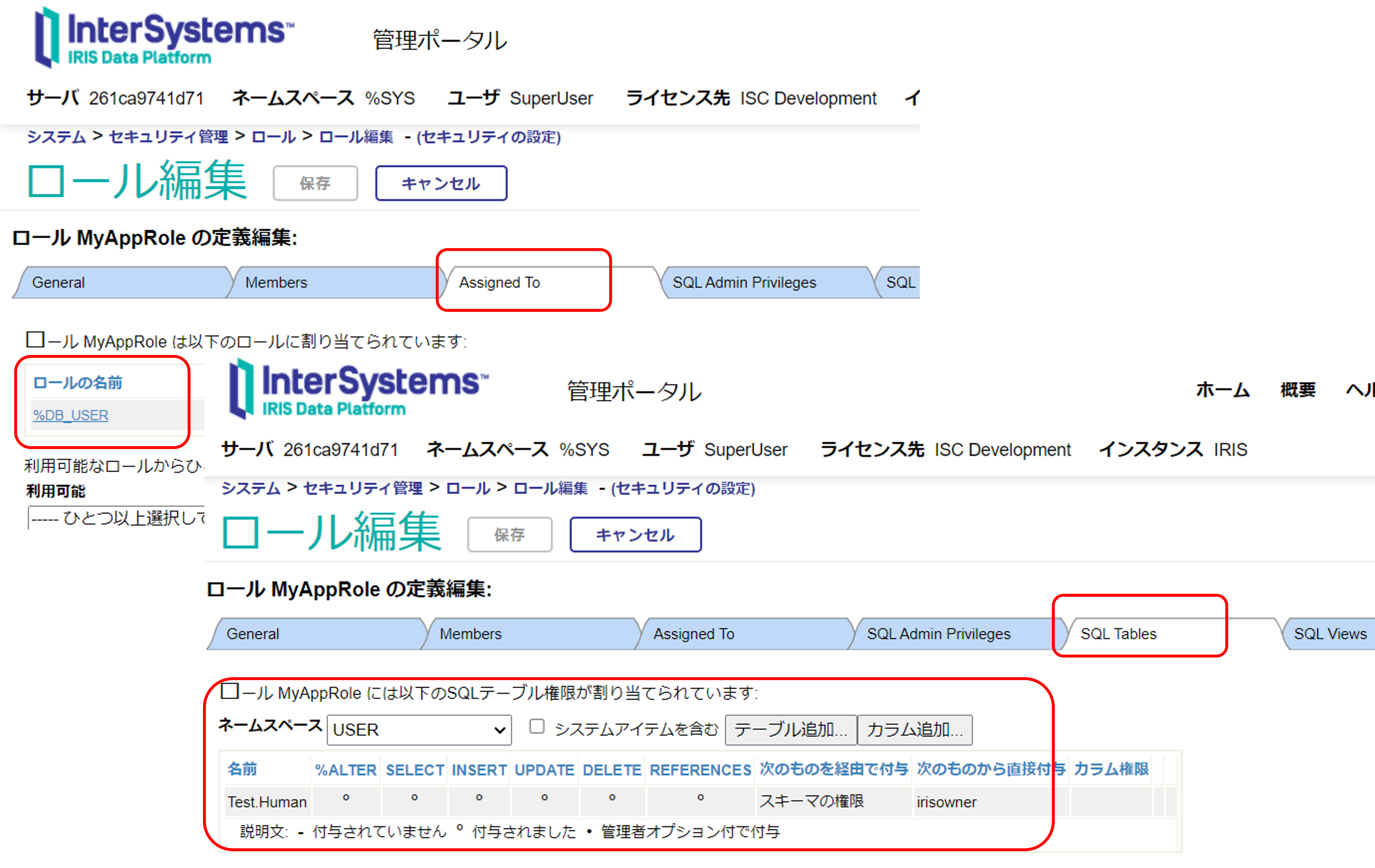
管理ポータルでは以下のように設定を確認できます。

管理ポータル > [システム管理] > [セキュリティ] > [ロール] > [MyAppRole]の[Assigned To]と[SQL Tables]のタブ


作成したMyAppRoleをアプリケーション利用時に追加するようにREST用のウェブアプリケーションを定義します。

作成には、Security.ApplicationsクラスCreate()メソッドを利用します。

Create()メソッドの第2引数には設定に必要な情報を配列変数で指定します。サブスクリプトの指定については以下の通りです。

  • DispatchClass:RESTディスパッチクラス名を指定します。
  • NameSpace:RESTディスパッチクラスがあるネームスペースを指定します。
  • Enable:アプリケーションを有効とする場合は1を指定します。
  • AutheEnabled:認証なしは64を設定します。詳細はAutheEnabledプロパティの説明をご参照ください。(認証なしは Bit 6のAutheUnauthenticated の値を設定します。)
  • MatchRoles:アプリケーション通過時に付与するアプリケーションロールの場合は、:ロール名 を設定します。

%SYSネームスペースで以下実行します。 

set webName="/testApp"
set webProperties("DispatchClass")="Test.REST"
set webProperties("NameSpace")="USER"
set webProperties("Enable")=1
set webProperties("AutheEnabled")=64
set webProperties("MatchRoles")=":MyAppRole"
set status=##class(Security.Applications).Create(webName, .webProperties)

戻り値を確認します。(1が返れば成功です。)

失敗している場合は、以下の出力をご確認ください。

do $system.OBJ.DisplayError(status)

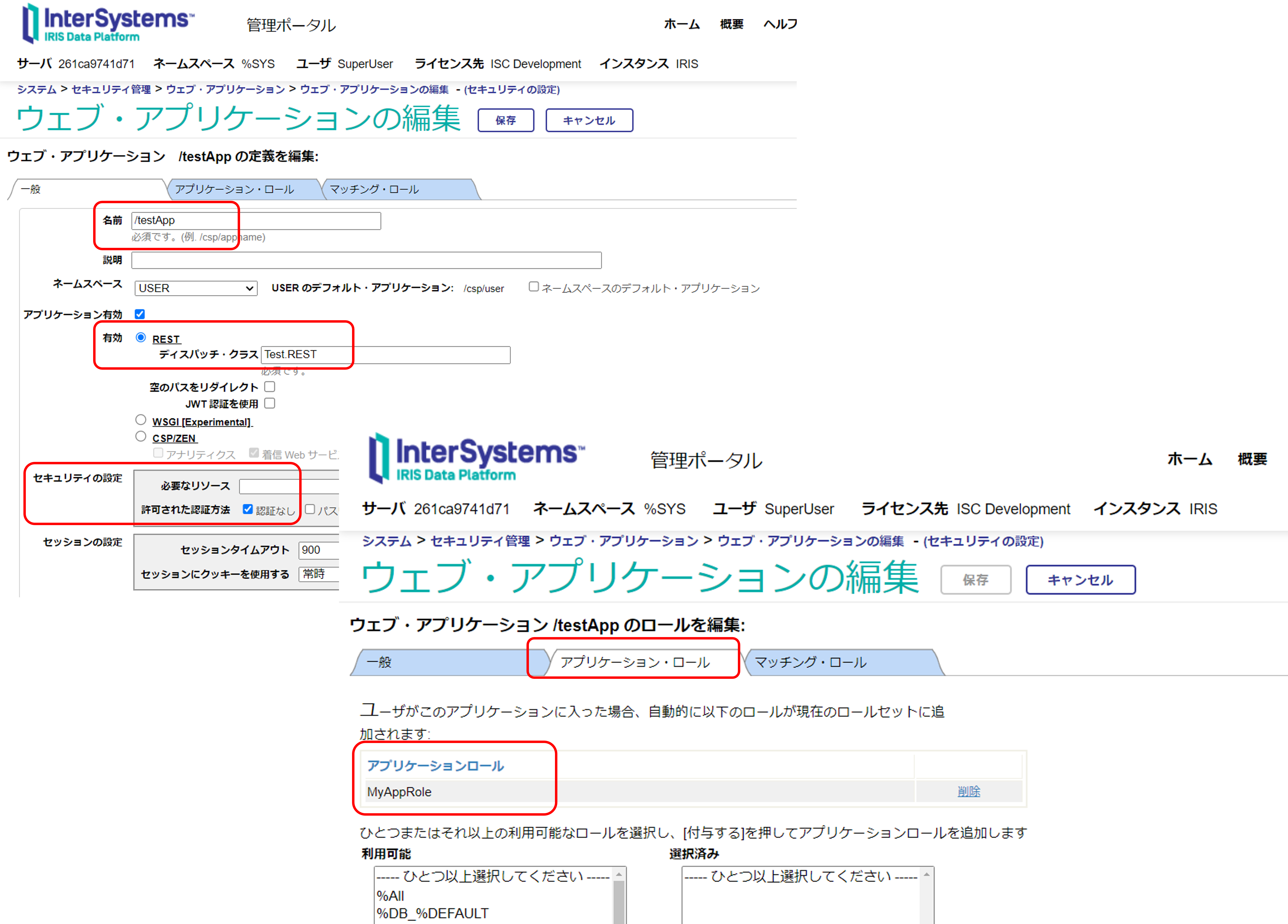
管理ポータルでは以下のように表示されます。

管理ポータル > [システム管理] > [セキュリティ] > [アプリケーション] > [ウェブ・アプリケーション] > /testApp選択


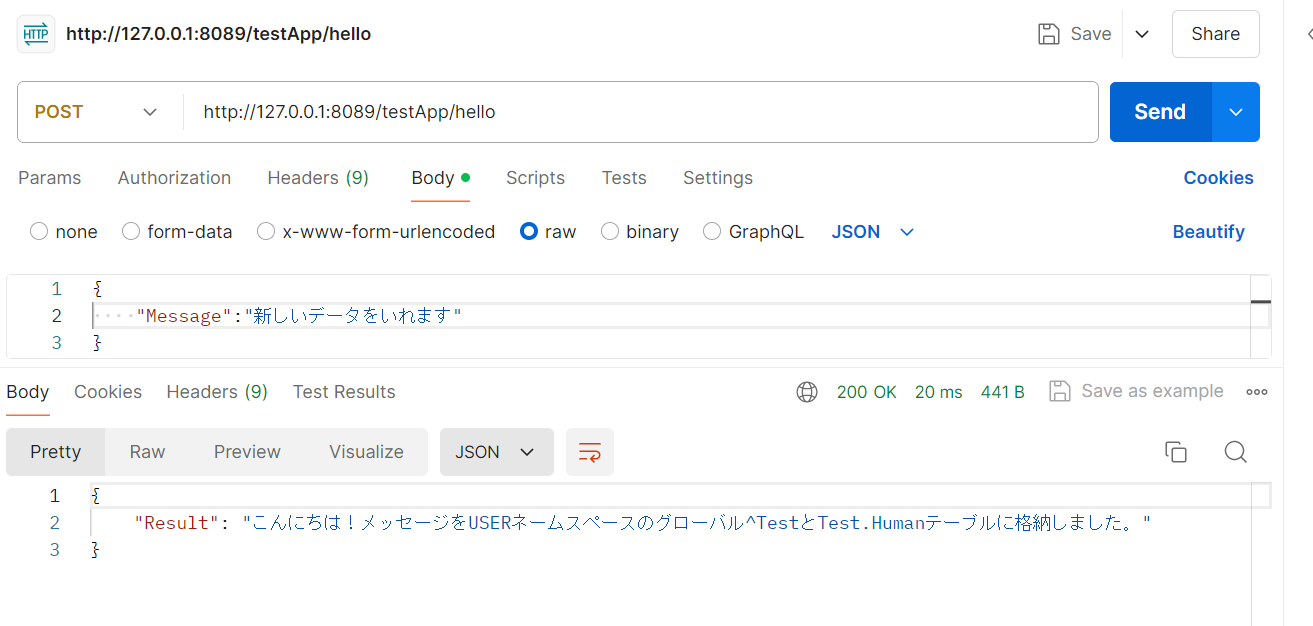
設定が完了したので最初にPOST要求を試します。 URLには、webサーバ/testApp/hello を指定しBodyに以下のプロパティを持つJSONを指定しPOST要求をテストします。

{
    "Message":"新しいデータをいれます"
}

 POST要求が成功すると、以下応答として返送します。

{
    "Result": "こんにちは!メッセージをUSERネームスペースのグローバル^TestとTest.Humanテーブルに格納しました。"
}

グローバル^Test、またはTest.Humanの中身をご確認ください。


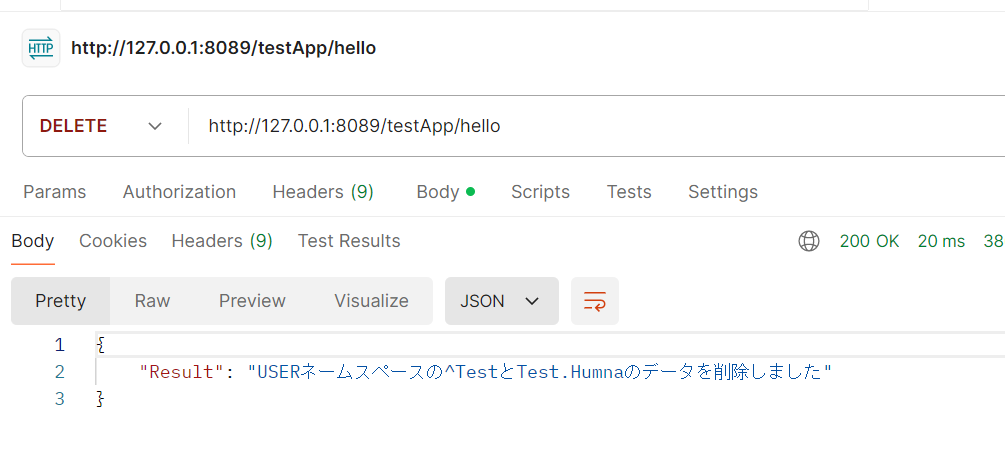
続いて、DELETE要求を実行します。(POSTと同じURLを使用します)

 DELETE要求が成功すると、以下応答として返送します。

{
    "Result": "USERネームスペースの^TestとTest.Humnaのデータを削除しました"
}

グローバル^TestとTest.Humanテーブルのデータが削除されたことを確認してください。


ご参考:RESTアプリケーション(/testApp)にテーブル権限を設定し忘れると以下のエラーが出力されます。

{
    "errors": [
        {
            "code": 5540,
            "domain": "%ObjectErrors",
            "error": "エラー #5540: SQLCODE: -99 メッセージ: User UnknownUser is not privileged for the operation",
            "id": "SQLCode",
            "params": [
                -99,
                "User UnknownUser is not privileged for the operation"
            ]
        }
    ],
    "summary": "エラー #5540: SQLCODE: -99 メッセージ: User UnknownUser is not privileged for the operation"
}
Discussão (0)1
Entre ou crie uma conta para continuar
Pergunta
· Jul. 15, 2024

Class methods vs MAC routines

Hello everyone,

I just want to know if there is a difference in performance between using Class methods versus MAC routines?

For example:

do Method^MyFunction()

versus

do ##class(MyFunction).Method()

2 Comments
Discussão (2)1
Entre ou crie uma conta para continuar
Discussão (5)3
Entre ou crie uma conta para continuar
Pergunta
· Jul. 15, 2024

General Logging In ObjectScript Classes (forDebugging)

I am trying to log certain program data in my ObjectScript REST class, to track down a bug I have. I am comparing two values at runtime, and one result does one thing, and another a different thing. Since this is a REST API class, I have no way of seeing in real time what the value is to debug. I cannot simply run the method in debug in Studio as it will not run properly being a REST class method, nor have the correct incoming header data to correctly replicate what is happening in the API at runtime when being hit by client apps. In other languages like C# or Java, when I would debug an API method like this, I would put in a line like
logger.Log("debug", {string containing any useful info for debugging the problem}...)
and then hit my services with the client app, run the scenario in question, and then check the logs and see what happened. I cannot figure out how to do this in ObjectScript. I've looked in the documentation for Logging, and all I've found so far are exception logging references, which is not what I'm after. Is there any way to do what I'm trying to do in ObjectScript classes?

6 Comments
Discussão (6)6
Entre ou crie uma conta para continuar
Anúncio
· Jul. 15, 2024

Technology Bonuses for the InterSystems Python Contest 2024

Hi Developers!

Here are the technology bonuses for the InterSystems Python Contest 2024 that will give you extra points in the voting:

  • IRIS Vector Search usage - 3
  • Python Pex Interoperability - 3
  • Python in BPL - 2
  • WSGI Web Apps - 2
  • Python libs: sqlalchemy and dbt - 2
  • LLM AI or LangChain usage: Chat GPT, Bard and others - 3
  • NoObjectScriptLine - 3
  • Hugginface - 2
  • Docker container usage - 2 
  • ZPM Package deployment - 2
  • Online Demo - 2
  • Implement InterSystems Community Idea - 4
  • Find a bug in Embedded Python - 2
  • First Article on Developer Community - 2
  • Second Article On DC - 1
  • First Time Contribution - 3
  • Video on YouTube - 3
  • YouTube Short - 1

See the details below.<--break-><--break->

IRIS Vector Search - 3 points

Starting from 2024.1 release InterSystems IRIS contains a new technology vector search that allows to build vectors over InterSystems IRIS data and perform search of already indexed vectors. Use it in your solution and collect 5 bonus points. Here is the demo project that leverages it.

Python Pex Interoperability - 3 points

InterSystems IRIS has Python Pex Interoperability module that provides the option to develop InterSystems Interoperability productions from Python. Use it and collect 3 extra points for your application. It's OK also to use alternative python.pex wheel introduced by Guillaume Ronguier in this project and template.

Python in BPL - 2 points

While building IRIS Interoperability productions it is possible to code BPL in with python now. Use it in your application and collect 2 extra bonus points! See the release notes. Example.

WSGI Web Apps - 2 points

The 2024.1 InterSystems IRIS release goes with an experimental feuture that allows to deploy WSGI Web Apps for IRIS. Take a look at three example applications for flask, fast-api and django to deploy IRIS apps with WSGI support.

Python libs: sqlalchemy and dbt - 2

Use sqlachemy and dbt for IRIS community libs and collect 2 additional bonus points for each.

LLM AI or LangChain usage: Chat GPT, Bard and others - 3 points

Collect 6 bonus expert points for building a solution that uses LangChain libs or Large Language Models (LLM) such as ChatGPT, Bard and other AI engines like PaLMLLaMA and more. AutoGPT usage counts too.

A few examples already could be found in Open Exchange: iris-openai, chatGPT telegram bot.

Here is an article with langchain usage example.

Pure Python(NoObjectScriptLine) - 3 points

We are introducing several python APIs in this contest! And the bonus is yet another challenge: build your python solution with InterSystems IRIS and try to avoid using even a line of ObjectScript! IRIS Classes with only Embedded Python methods are OK though. Do it and collect 4 bonus points more!

Here is a template that demonstrates how you can use IRIS without a line of ObjectScript. Yes, it contains ObjectScript classes for demo purpose but you can delete it in your app.

HuggingFace - 2

Deploy your solution at the hugging face repository and collect 2 extra points. Example.

Docker container usage - 2 points

The application gets a 'Docker container' bonus if it uses InterSystems IRIS  running in a docker container. Here is the simplest template to start from.

ZPM Package deployment - 2 points

You can collect the bonus if you build and publish the ZPM(InterSystems Package Manager) package for your Full-Stack application so it could be deployed with:

zpm "install your-multi-model-solution"

command on IRIS with ZPM client installed. 

ZPM client. Documentation.

Online Demo of your project - 2 points
Collect 2 more bonus points if you provision your project to the cloud as an online demo. You can do it on your own or you can use this template - here is an Example. Here is the video on how to use it.

Implement Community Opportunity Idea - 4 points

Implement any idea from the InterSystems Community Ideas portal which has the "Community Opportunity" status. This will give you 4 additional bonus points.

Find a bug in Embedded Python - 2 points
We want the broader adoption of InterSystems Embedded python, so we encourage you to report the bugs you will face during the development of your python application with IRIS in order to fix it. Please submit the bug here in a form of issue and how to reproduce it. You can collect 2 bonus points for the first reproducible bug.

Article on Developer Community - 2 points

Write a brand new article on Developer Community that describes the features of your project and how to work with it. Collect 2 points for the article. 
*This bonus is subject to the discretion of the experts whose decision is final.

The Second article on Developer Community - 1 point

You can collect one more bonus point for the second article or the translation of the first article. The second article should go into detail of a feature of your project. The 3rd and more articles will not bring more points, but the attention will be all yours. 
*This bonus is subject to the discretion of the experts whose decision is final.

First Time Contribution - 3 points

Collect 3 bonus points if you participate in InterSystems Open Exchange contests for the first time!

Video on YouTube - 3 points

Make the Youtube video demonstrating your product in action and collect 3 bonus points each.

YouTube Short - 1 point

Make a YouTube Short demonstrating your product in action and collect 1 bonus point each.

The list of bonuses is subject to change. Stay tuned!

Good luck in the competition!

Discussão (0)1
Entre ou crie uma conta para continuar