Class Queries in InterSystems IRIS (and Cache, Ensemble, HealthShare) is a useful tool that separates SQL queries from code. Basically, it works like this: suppose that you want to use the same SQL query with different arguments in several different places.In this case you can avoid code duplication by declaring the query body as a class query and then calling this query by name. This approach is also convenient for custom queries, in which the task of obtaining the next row is defined by a developer. Sounds interesting? Then read on!
Arquivar
Intro
Please note, this article is considered deprecated, check out the new revision over here: https://community.intersystems.com/post/tutorial-websockets
The goal of this post is to discuss working with Websockets in a Caché environment. We are going to have a quick discussion of what websockets are and then talk through an example chat application implemented on top of Websockets.
Is anyone in the fine community of developers who work with ISC technologies looking at Microsoft's Visual Studio Code offering?
One of Bill McCormick's recent posts about Atelier referred to Visual Studio being considered the best IDE. Granted, Code is far less of a tool than VS, and probably always will be. But it claims to be open source and cross-platform, i.e. Linux and OS X as well as Windows.
I'm not 100% sure my post belongs in the Atelier group, but didn't see any other group that would be a better home. Might we benefit from a "Tools" group?
Your application is deployed and everything is running fine. Great, hi-five! Then out of the blue the phone starts to ring off the hook – it’s users complaining that the application is sometimes ‘slow’. But what does that mean? Sometimes? What tools do you have and what statistics should you be looking at to find and resolve this slowness? Is your system infrastructure up to the task of the user load? What infrastructure design questions should you have asked before you went into production? How can you capacity plan for new hardware with confidence and without over-spec'ing? How can you stop the phone ringing? How could you have stopped it ringing in the first place?
 Hello!
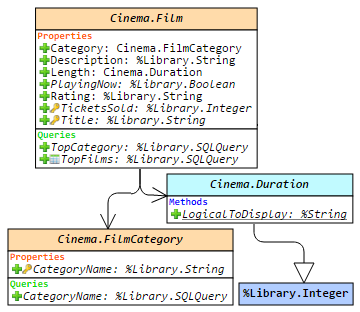
This article is a small overview of a tool that helps to understand classes and their structure inside the InterSystems products: from IRIS to Caché, Ensemble, HealthShare.
In short, it visualizes a class or an entire package, shows the relations between classes and provides all the possible information to developers and team leads without making them go to Studio and examine the code there.
If you are learning InterSystems products, reviewing projects a lot or just interested in something new in InterSystems Technology solutions — you are more than welcome to read the overview of ObjectScript Class Explorer!
The topic of for/while loop performance in Caché ObjectScript came up in discussion recently, and I'd like to share some thoughts/best practices with the rest of the community. While this is a basic topic in itself, it's easy to overlook the performance implications of otherwise-reasonable approaches. In short, loops iterating over $ListBuild lists with $ListNext or over a local array with $Order are the fastest options.
As a motivating example, we will consider looping over the pieces of a comma-delimited string.
Order is a necessity for everyone, but not everyone understands it in the same way (Fausto Cercignani)
Disclaimer: This article uses Russian language and Cyrillic alphabet as examples, but is relevant for anyone who uses Caché in a non-English locale. Please note that this article refers mostly to NLS collations, which are different than SQL collations. SQL collations (such as SQLUPPER, SQLSTRING, EXACT which means no collation, TRUNCATE, etc.) are actual functions that are explicitly applied to some values, and whose results are sometimes explicitly stored in the global subscripts. When stored in subscripts, these values would naturally follow the NLS collation in effect (“SQL and NLS Collations”).
For each defined property, query or an index, several corresponding methods would be automatically generated on a class compilation. These methods can be very useful. In this article, I would describe some of them.
Alex Koblov posted today a #CachéHaiku:
Full command names

Make your code more readable

Than compact versions
My haiku:
Caché Globals

Shows you keys to the value

If you $order it
Your variant? ;)
Hi, Community!
Today there are two main settings for your email notification subscriptions.
1. Subscribe to all new posts, all comments, all answers
You can do it in your subscription settings in the Content Types. Click on My Account, go to Subscriptions and click on Content types tab:

In this case, you'll get only one notification for every new article or question posted on DC and every answer and comment if you checked this option.
Here are some recipes with this option.
1. Receive all the new posts notifications (without answers and comments in it):
Turn on Post checkbox.
2.
Question:
My journal files are growing rapidly - what could be the cause? How can I minimize the phenomena?
Have some free text fields in your application that you wish you could search efficiently? Tried using some methods before but found out that they just cannot match the performance needs of your customers? Do I have one weird trick that will solve all your problems? Don’t you already know!? All I do is bring great solutions to your performance pitfalls!
As usual, if you want the TL;DR (too long; didn’t read) version, skip to the end. Just know you are hurting my feelings.
If you open up your version of Sample.
 In the previous article, I had just started working with Arduino, and got a meteorological station to show as a result. In this article, let's go further: we will set up authentication via RFID cards and Arduino against the InterSystems Caché application.
InterSystems Caché globals provide very convenient features for developers. But why are globals so fast and efficient?
Theory
Basically, the Caché database is a catalog having the same name as the database and containing the CACHE.DAT file. On Unix systems, the database can also be an ordinary disk partition.
All data in Caché is stored in blocks which, in turn, are organized as a balanced B* tree. Taking into account that all globals are basically stored in a tree, global's subscripts will be represented as branches, while values of global's subscripts will be stored as leaves.
End users sure love Excel tables. So, how can you deliver the second to the first? Read this post to find out.
In this article, we will discuss about Orphaned Messages.
What is an Orphaned Message
Every message body is associated with a message Header which holds the metadata. The Header holds information like source configuration name, target configuration name, time created, time processed, associated message body reference, session information, message body class name, message status. When there are message body records that do not have their corresponding Header records those are called Orphan message bodies. We will discuss possible causes which could end up with orphan message bodies.
Following up on the topic of making sure that referenced instances are deleted when the referrer is deleted –
Greetings, InterSystems community!
I am pleased to announce that the web terminal project, Caché WebTerminal version 4 gets its release! After long period of enhancing this web application from 2013, it came to the version 4, which features major stability and security improvements, intelligent autocomplete and syntax highlighting, convenient SQL mode and a lot of other useful features.
The goal of this article is to spread the knowledge about this project over the InterSystems community.
Note (October 2022): yape has been deprecated and replaced by YASPE, there is no more development on yape.
Note (June 2019): A lot has changed, for the latest details go here
Note (Sept 2018): There have been big changes since this post first appeared, I suggest using the Docker Container version, the project and details for running as a container are still in the same place published on GitHub so you can download, run - and modify if you need to.
In my previous article, we reviewed possible use-cases for macros, so let’s now proceed to a more comprehensive example of macros usability. In this article we will design and build a logging system.
Logging system
Logging system is a useful tool for monitoring the work of an application that saves a lot of time during debugging and monitoring. Our system would consist of two parts:
- Storage class (for log records)
- Set of macros that automatically add a new record to the log