Encontrar

Anúncio
· Nov. 20, 2024

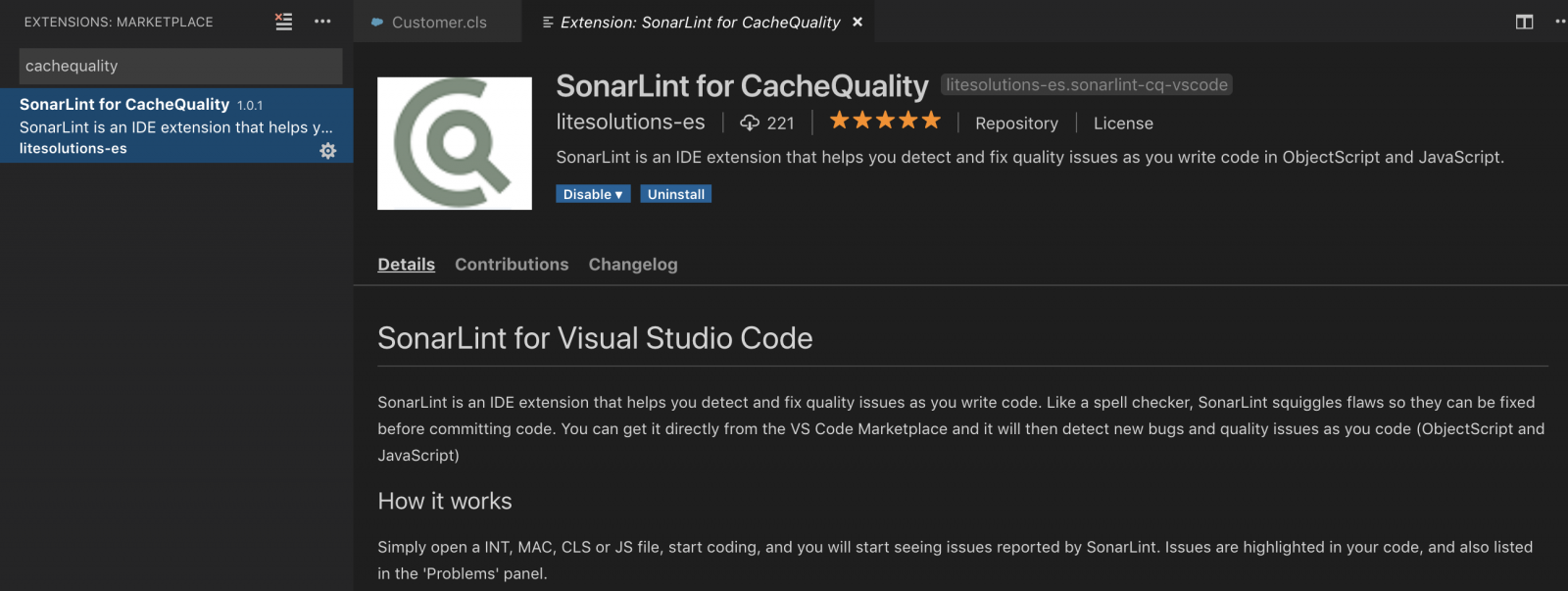
CachéQuality for VSCode がリリースされました

ほとんどの方が @Daniel TamajonCachéQuality プロジェクトをご存知かと思います。 まだご存知でない方のために説明すると、InterSystems 製品用に記述されたコードの静的構文アナライザーです。 コード内の様々な種類の問題や潜在的なバグがお客様のプロダクション環境で見つかる前に、それらを検出して解決するのに役立てられます。 つまり、CachéQuality を使用することで、より優れた製品を提供できるようになります。 ObjectScript コードのチェックに使用されるルールの完全なリストは、こちらをご覧ください。

これは Studio ですでに提供されているものですが、 VSCode でも使用できるようになりました。

Discussão (0)1
Entre ou crie uma conta para continuar
Pergunta
· Nov. 19, 2024

How to create a signed JWT

I need to create a JWT to connect to EPIC FHIRserver sandbox.

https://fhir.epic.com/Documentation?docId=oauth2&section=BackendOAuth2Guide

You will generate a one-time use JSON Web Token (JWT) to authenticate your app to the authorization server and obtain an access token that can be used to authenticate your app's web service calls. There are several libraries for creating JWTs. See jwt.io for some examples.

The header and payload are then base64 URL encoded, combined with a period separating them, and cryptographically signed using the private key to generate a signature.

I attempted using this code:

ClassMethod test2() As %Status

{

    #Dim sigJOSE As %DynamicObject

    #Dim encJOSE As %DynamicObject

    #Dim claims As %DynamicObject

    Set ts = $ZTIMESTAMP  // 67161,81327.6633447

    Set exp = ##class(%OAuth2.Utils).TimeInSeconds(ts,300)

    Set nbf = ##class(%OAuth2.Utils).TimeInSeconds(ts,0)

    Set iat = ##class(%OAuth2.Utils).TimeInSeconds(ts,0)

    Set sigJOSE = {}

    Set sigJOSE.alg = "RS384"

    Set sigJOSE.typ = "JWT"

    Set header = sigJOSE.%ToJSON()

    Set claims = {}

    Set claims.iss = "863e73c5-9839-4b54-8205-c9404d2bb762"

    Set claims.sub = claims.iss

    Set claims.aud = "https://fhir.epic.com/interconnect-fhir-oauth/oauth2/token"

    Set claims.jti = "f9eaafba-2e49-11ea-8880-5ce0c5aee679"

    Set claims.exp = exp

    Set claims.nbf = nbf

    Set claims.iat = iat

    Set payload = claims.%ToJSON()

    //Set sigJWKS = ..MyKeys()

    //Set encJWKS = ""

    //Set tSC = ##class(%Net.JSON.JWT).Create(sigJOSE,{},claims,sigJWKS,encJWKS,.JWT)

    //Do $System.Status.DisplayError(tSC)

    Set bitLength = 384

    Set flags = 0

    Set tData = ##class(%SYSTEM.Encryption).Base64Encode(header,flags)_"."_##class(%SYSTEM.Encryption).Base64Encode(payload,flags)

    Set key = ..PrivateKey()

    //Set privKeyPassword = ""

    Set x = ##class(%SYSTEM.Encryption).RSASHA3Sign(bitLength, tData, key)

    zw

    Quit x

}

x does not look like the expected value

5 Comments
Discussão (5)1
Entre ou crie uma conta para continuar
Artigo
· Nov. 19, 2024 2min de leitura

第二十六章 TCP 客户端 服务器通信 - $ZB 和 READ 命令

第二十六章 TCP 客户端 服务器通信 - $ZB 和 READ 命令

$ZBREAD 命令

$ZB 保存终止读取的字符。该字符可以是以下之一:
- 终止字符,例如回车
- 固定长度 READ x#y 的第 y 个字符
- READ *X 的单个字符
- 定时读取过期后的空字符串
- 转义序列
- 请注意,如果一个字符串以 CR LF 结尾,则只有 CR 会放在 $ZB 中。

TCP 设备的 WRITE 命令

在使用 OPENUSE 建立连接后,WRITE 命令将数据从客户端或服务器发送到 TCP 设备。

语法如下:

Discussão (0)1
Entre ou crie uma conta para continuar
Pergunta
· Nov. 19, 2024

Special Configuration Required for Webgateway/git-source-control?

Hi there,

I'm attempting to use the newest version of git-web-ui now that we've also updated to 2024.1.2. I'm having an issue though where I'm getting a 404 when launching the web gui from the Source Control menu in a production. If I look in the nginx logs I see the following:

2024/11/19 22:00:47 [error] 16#0: *237 open() "/opt/nginx/html/isc/studio/usertemplates/gitsourcecontrol/webuidriver.csp/CUSTRUSH/CUSTRUSHPKG.FoundationProduction.CLS" failed (2: No such file or directory), client: 172.18.0.1, server: localhost, request: "GET /isc/studio/usertemplates/gitsourcecontrol/webuidriver.csp/CUSTRUSH/CUSTRUSHPKG.FoundationProduction.CLS?CSPSHARE=1&Project=&Document=localhost%3A9092%2FCUSTRUSH%2FCUSTRUSHPKG.FoundationProduction.CLS&Namespace=CUSTRUSH&User=_SYSTEM&CSPCHD=003000010000NxIbs1CgxCPtuWk_mjSx$SMbYM89ukHTqebjji HTTP/1.1", host: "localhost:9092", referrer: "http://localhost:9092/csp/healthshare/custrush/EnsPortal.Dialog.SourceCo...?$ZEN_POPUP=1&TARGET=%2Fisc%2Fstudio%2Fusertemplates%2Fgitsourcecontrol%2Fwebuidriver.csp%2FCUSTRUSH%2FCUSTRUSHPKG.FoundationProduction.CLS%3FCSPSHARE%3D1%26CSPCHD%3D003000010000NxIbs1CgxCPtuWk_mjSx%24SMbYM89ukHTqebjji%26Project%3D%26Document%3Dlocalhost%253A9092%252FCUSTRUSH%252FCUSTRUSHPKG.FoundationProduction.CLS%26Namespace%3DCUSTRUSH%26User%3D_SYSTEM%26"


I'm wondering if there's some setup in nginx or CSP.conf that I"m missing here or if anyone has run into anything similar?

-Vic

6 Comments
Discussão (6)2
Entre ou crie uma conta para continuar
Anúncio
· Nov. 19, 2024

[Video] Keeping your data private and protected with RAG

Hi Community!

Ceck out the new video dedicated to Gen AI on our InterSystems Developers YouTube:

⏯ Keeping your data private and protected with RAG

Explore how to safely utilize Language Learning Models (LLMs) while safeguarding Protected Health Information (PHI) in healthcare settings. Understand why converting data into numbers alone doesn’t guarantee privacy, the risks of using LLM services with PHI, and the strategies to ensure confidentiality. In this video, we’ll cover methodologies to protect your internal databases while leveraging the power of LLMs and take a closer look at how Retrieval Augmented Generation (RAG) can be applied securely with PHI.

🗣  Presenter@Don Woodlock, Vice President, Healthcare Solutions Development, InterSystems

Enjoy watching, and look forward to more videos! 👍

Discussão (0)1
Entre ou crie uma conta para continuar