Criação de uma aplicação web React simples com backend IRIS: resolução de CORS
Integrar aplicações frontend de React com serviços backend como a base de dados IRIS através de APIs REST pode ser uma forma poderosa de contruir aplicações web robustas. No entanto, um obstáculo comum que os desenvolvedores costumam encontrar é o problema de Cross-Origin Resource Sharing (CORS), que pode impedir que o frontend acesse os recursos no backend devido a restrições de segurança impostas pelos navegadores web. Nesse artigo, exploraremos como abordar os problemas de CORS ao integrar aplicações web de React com serviços backend de IRIS.
Criando o esquema
Começamos definindo um esquema simples chamado Pacientes:
Class Prototype.DB.Patients Extends %Persistent [ DdlAllowed ] {
Property Name As %String;

Property Title As %String;

Property Gender As %String;

Property DOB As %String;

Property Ethnicity As %String;
}
Você pode inserir alguns dados de teste na tabela. Pessoalmente, acho o Mockaroo útil quando se trata de criar dados falsos. Ele permite fazer o download dos dados de teste como um arquivo .csv que pode ser importado diretamente no Portal de Administração.
Definição de serviços REST
Logo, definimos alguns serviços REST.
Class Prototype.DB.RESTServices Extends %CSP.REST {
Parameter CONTENTTYPE = "application/json";

XData UrlMap [ XMLNamespace = "http://www/intersystems.com/urlmap" ]
{


}

ClassMethod GetPatients() As %Status
{
    #Dim tStatus As %Status = $$$OK

    #Dim tSQL As %String = "SELECT * FROM Prototype_DB.Patients ORDER BY Name"

    #Dim tStatement As %SQL.Statement = ##class(%SQL.Statement).%New()

    Set tStatus = tStatement.%Prepare(tSQL)

    If ($$$ISERR(tStatus)) Return ..ReportHttpStatusCode(..#HTTP400BADREQUEST, tStatus)

    #Dim tResultSet As %SQL.StatementResult

    Set tResultSet = tStatement.%Execute()

    #Dim tPatients As %DynamicArray = []

    While (tResultSet.%Next()) {
        #Dim tPatient As %DynamicObject = {}
        Set tPatient.ID = tResultSet.ID
        Set tPatient.Name = tResultSet.Name
        Set tPatient.Title = tResultSet.Title
        Set tPatient.Gender = tResultSet.Gender
        Set tPatient.DOB = tResultSet.DOB
        Set tPatient.OrderedBy = tResultSet.OrderedBy
        Set tPatient.DateOfOrder = tResultSet.DateOfOrder
        Set tPatient.DateOfReport = tResultSet.DateOfReport
        Set tPatient.Ethnicity = tResultSet.Ethnicity
        Set tPatient.HN = tResultSet.HN
        Do tPatients.%Push(tPatient)
    }
    Do ##class(%JSON.Formatter).%New().Format(tPatients)
    Quit $$$OK
}

ClassMethod UpdatePatientName(pID As %Integer)
{
    #Dim tStatus As %Status = $$$OK
    #Dim tPatient As Prototype.DB.Patients = ##class(Prototype.DB.Patients).%OpenId(pID,, .tStatus)
    If ($$$ISERR(tStatus)) Return ..ReportHttpStatusCode(..#HTTP404NOTFOUND, tStatus)
    #Dim tJSONIn As %DynamicObject = ##class(%DynamicObject).%FromJSON(%request.Content)
    Set tPatient.Name = tJSONIn.Name
    Set tStatus = tPatient.%Save()
    If ($$$ISERR(tStatus)) Return ..ReportHttpStatusCode(..#HTTP400BADREQUEST, tStatus)
    #Dim tJSONOut As %DynamicObject = {}
    Set tJSONOut.message = "patient name updated successfully"
    Set tJSONOut.patient = ##class(%DynamicObject).%New()
    Set tJSONOut.patient.ID = $NUMBER(tPatient.%Id())
    Set tJSONOut.patient.Name = tPatient.Name
    Do ##class(%JSON.Formatter).%New().Format(tJSONOut)
    Quit $$$OK
}

}
Logo, seguimos para registrar a aplicação web no portal de administração.
- No Portal de Adminsitração, navegue a
Administração do Sistema -> Segurança -> Aplicação - Aplicação Web -> Criar Nova Aplicação Web. - Preencha o formulário confome mostrado a seguir
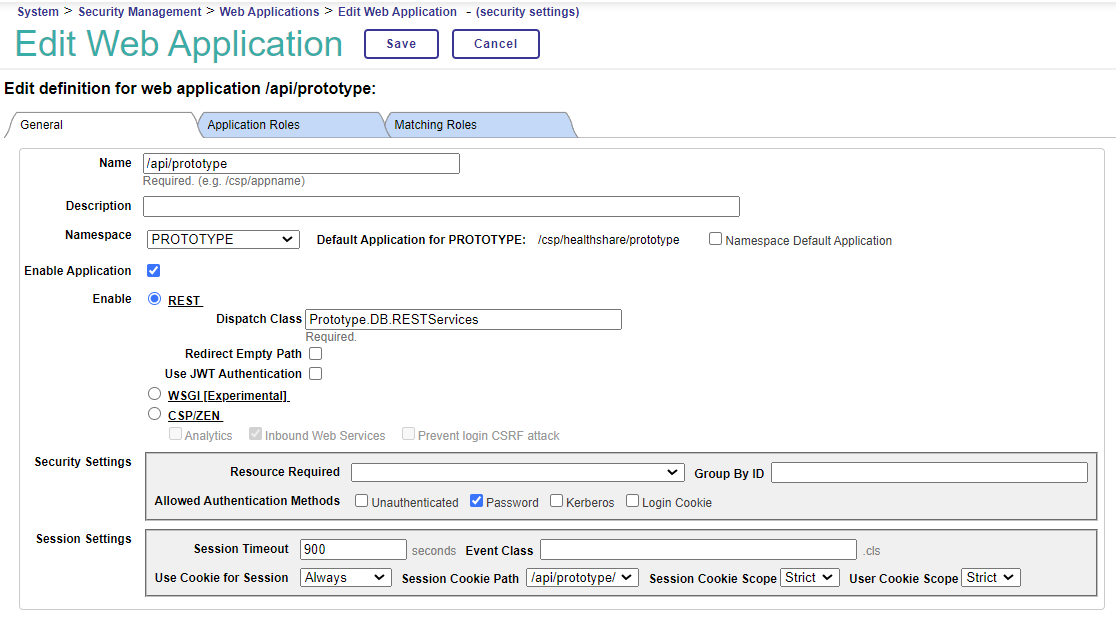
- As APIs definidas em
Prototype/DB/RESTServices.clsestarão disponíveis emhttp://localhost:52773/api/prototype/* - Agora podemos verificar que as APIs estão disponíveis solicitando os endpoints usando o Postman.
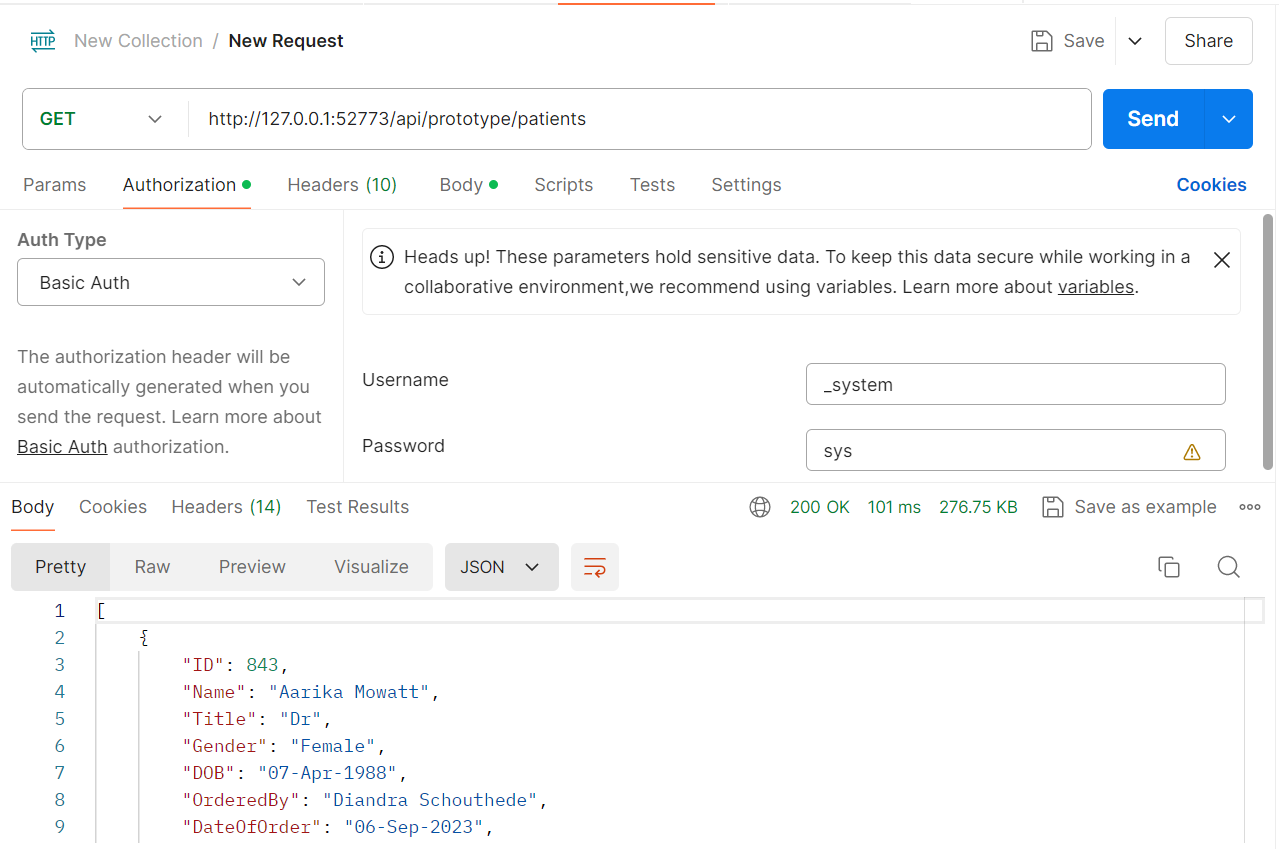
Criando o frontend
Eu utilizei o Next.js para criar um frontend simples. Next.js é uma framework popular de React que permite que os desenvolvedores construam aplicações React renderizados do lado do servidor (SSR) com facilidade.
O meu frontend é uma tabela simples que mostra os dados de pacientes armazenados no IRIS e oferece a funcionalidade para atualizar os nomes dos pacientes.
 const getPatientData = async () => {
    const username = '_system'
    const password = 'sys'
    try {
        const response: IPatient[] = await (await fetch("http://localhost:52773/api/prototype/patients", {
        method: "GET",
        headers: {
          "Authorization": 'Basic ' + base64.encode(username + ":" + password),
          "Content-Type": "application/json"
        },
      })).json()
      setPatientList(response);
    } catch (error) {
      console.log(error)
    }
  }
Parece que temos tudo pronto, mas se executarmos npm run dev diretamente, obtemos um erro de CORS :(
Resolvendo CORS
Um erro de CORS ocorre quando uma aplicação web tenta fazer uma solicitação a um recurso em domínio diferente e a política de CORS do servidor restringe o acesso desde a origem do cliente, resultando em que a solicitação seja bloqueada pelo navegador. Podemos resolver o problema de CORS tanto no frontend como no backend.
Estabelecer headers de resposta (o enfoque de backend)
Primeiro, adicionamos o parâmetro HandleCorsRequest à mesma classe de dispatch Prototype/DB/RESTServices.cls onde definimos os endpoints da API.
Parameter HandleCorsRequest = 1;
Logo, definimos o método OnPreDispatch dentro de sua classe dispatcher para estabelecer os headers de resposta.
   ClassMethod OnPreDispatch() As %Status
    {
        Do %response.SetHeader("Access-Control-Allow-Credentials","true")
        Do %response.SetHeader("Access-Control-Allow-Methods","GET, PUT, POST, DELETE, OPTIONS")
        Do %response.SetHeader("Access-Control-Max-Age","10000")
        Do %response.SetHeader("Access-Control-Allow-Headers","Content-Type, Authorization, Accept-Language, X-Requested-With")
        quit $$$OK
    }
Uso do proxy Next.js (o enfoque frontend)
No seu arquivo next.config.mjs, adicione a função de reescrita (rewrite) da seguinte maneira:
 /** @type {import('next').NextConfig} */
        const nextConfig = {
            async rewrites() {
                return [
                    {
                        source: '/prototype/:path',
                        destination: 'http://localhost:52773/api/prototype/:path'
                    }
                ]
            }
        };

        export default nextConfig;
E atualize qualquer URL de fetch desde http://127.0.0.1:52773/api/prototype/:path a /prototype/:path.
O produto final
Para continuação deixo o código para a página frontend:
'use client'
import { NextPage } from "next"
import { useEffect, useState } from "react"
import { Table, Input, Button, Modal } from "antd";
import { EditOutlined } from "@ant-design/icons";
import type { ColumnsType } from "antd/es/table";
import base64 from 'base-64';
import fetch from 'isomorphic-fetch'
const HomePage: NextPage = () => {
const [patientList, setPatientList] = useState([]);
const [isUpdateName, setIsUpdateName] = useState(false);
const [patientToUpdate, setPatientToUpdate] = useState()
const [newName, setNewName] = useState('')
const getPatientData = async () => {
const username = '_system'
const password = 'sys'
try {
const response: IPatient[] = await (await fetch("http://localhost:52773/api/prototype/patients", {
method: "GET",
headers: {
"Authorization": 'Basic ' + base64.encode(username + ":" + password),
"Content-Type": "application/json"
},
})).json()
setPatientList(response);
} catch (error) {
console.log(error)
}
}
const updatePatientName = async () => {
let headers = new Headers()
const username = '_system'
const password = 'sys'
const ID = patientToUpdate?.ID
try {
headers.set("Authorization", "Basic " + base64.encode(username + ":" + password))
const response: { message: string, patient: { ID: number, Name: string } } =
await (await fetch(`http://127.0.0.1:52773/api/prototype/patient/${ID}`, {
method: "POST",
headers: headers,
body: JSON.stringify({Name: newName})
})).json()
let patientIndex = patientList.findIndex((patient) => patient.ID == response.patient.ID)
const newPatientList = patientList.slice()
newPatientList[patientIndex] = {...patientList[patientIndex], Name: response.patient.Name}
setPatientList(newPatientList);
setPatientToUpdate(undefined);
setNewName('')
setIsUpdateName(false)
} catch (error) {
console.log(error)
}
}
const columns: ColumnsType = [
{
title: 'ID',
dataIndex: 'ID',
},
{
title: "Title",
dataIndex: "Title"
},
{
title: 'Name',
dataIndex: 'Name',
render: (value, record, index) => {
return (
{value}
{
setIsUpdateName(true)
setPatientToUpdate(record)
}}>
)
}
},
{
title: "Gender",
dataIndex: 'Gender'
},
{
title: "DOB",
dataIndex: "DOB"
},
{
title: "Ethnicity",
dataIndex: "Ethnicity"
},
{
title: 'HN',
dataIndex: "HN"
}
]
useEffect(() => {
getPatientData();
}, [])
return (
<>
{
setIsUpdateName(false);
setPatientToUpdate(undefined);
setNewName('')
}}>
Update name for patient {patientToUpdate?.ID}
Original Name: { patientToUpdate?.Name}
setNewName(event.target.value)} />
{patientList.length > 0 && }
>
)
}
export default HomePage
Agora, quando visitar http://localhost:3000, isso é o que verá:
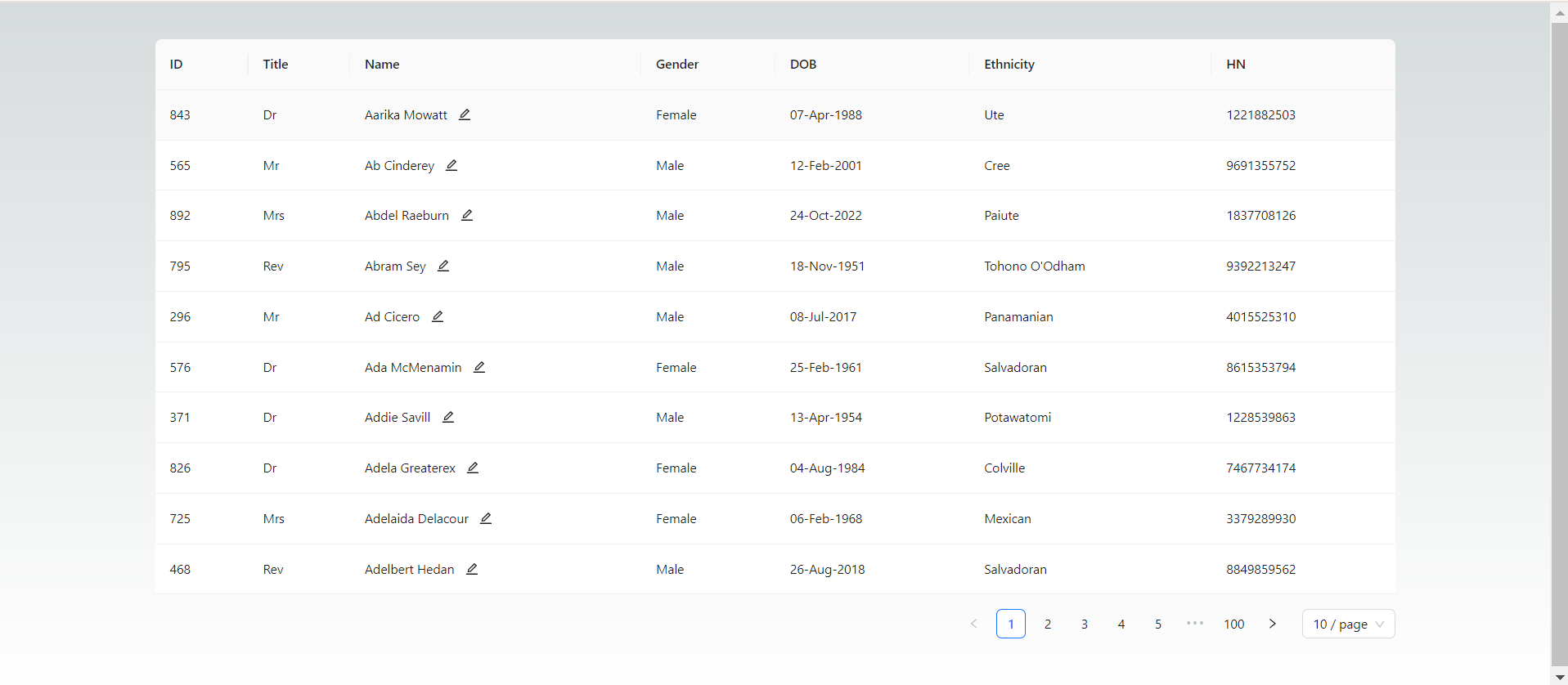
Repositório Github para o projeto: https://github.com/xili44/iris-react-integration
Gostaria de agradecer a Bryan (@Bryan Hoon), Julian(@Julian Petrescu) e Martyn (@Martyn Lee), da oficina de Singapura, por seu apoio e experiência.